
To edit your bio on Instagram is quite simple, although if you are new and using a desktop, you might find it confusing. This is because Instagram is officially developed to work on mobile phones.
Anyways, whether you choose to edit your bio on desktop or mobile, it’s all good and easy. This article will give you step-by-step actions to take on how to edit your bio on Instagram and everything you need to know about Instagram bio.
But first, you might ask, why do you really need to have a bio? I’ll tell you.
A Well-Crafted Instagram Bio Acts as a Mini Introduction to your Followers
Your bio is the small area just below your username where you share details about yourself or your business.
You can use it as a means to introduce yourself to people, tell them who you are, what you do, and maybe why they should follow you.
A well-written bio on Instagram helps people understand immediately what you do and what your account is all about.
Your Instagram Bio Increases the Chances of your Instagram Account Being Seen by your Ideal Followers
Whatever you want to post on your Instagram feed, there are people whom you wish to find it. These people are your ideal followers and editing your bio properly is a great way to attract them.
A well-written bio makes it easier to be seen by your ideal followers and quickens their decision to tap the follow button.
A good bio on Instagram includes hashtags (I will talk more about this later) and hashtags are great for Instagram growth.
Your Instagram bio creates connection right from the start
The growth and sustainability of your Instagram account largely depend on building relationships and to build relationships, you need to create connections.
Your bio on Instagram can create connections with new people who visit your profile from the start.
Think of your bio on Instagram as a mini “about me” section. Mini because Instagram allows only 150 characters so you have to keep it short and interesting.
But even with just 150characters, you can write a great, compelling bio on Instagram.
Here’s how,
How To Write a Great Bio On Instagram
I know you’re eager to edit your bio on Instagram but I need you to read this first.
It is not enough to know how to edit your bio on Instagram, you need to know how to write a great bio.
One that gives you the proper introduction to your ideal audience and creates a connection with people from the start.
How do you do that?
There are different ways to achieve a bio that speaks and truly communicates but here are some useful tips for you to keep in mind whenever you want to edit your bio on Instagram.
1. Start with who you are
The best Instagram bios state clearly who is behind the account, what they do. Stating who you are in the first line is a great way to connect immediately with your audience.
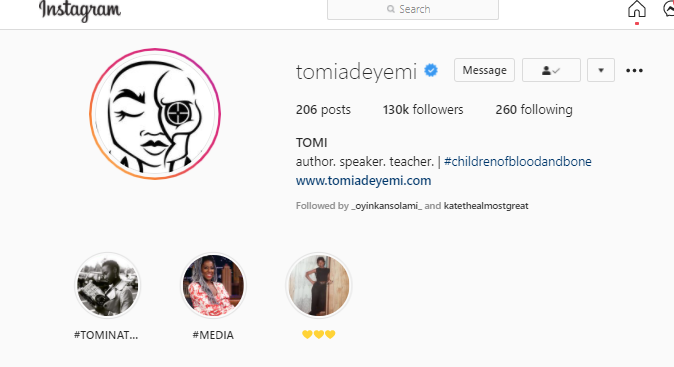
For example, if you are a writer, start by telling people you are a writer. Tomi Adeyemi’s Instagram bio does a great job starting with who she is. There is just one line stating clearly who she is. Author, Speaker, Teacher.
2. State clearly what you do and who you do it for
Perhaps you offer a service or have a product, state clearly what you do in your bio.
Make sure your bio on Instagram helps your audience understand what you do from the start and who you do it for.
When stating what you do and who you do, use this personal statement.
I help (audience) to (what you do) so that they can (what they stand to gain)
For example, coachnicole.co’s profile fits perfectly. She wrote I help coaches book out their coaching programs so they can have profitable coaching biz & be an expert coach.
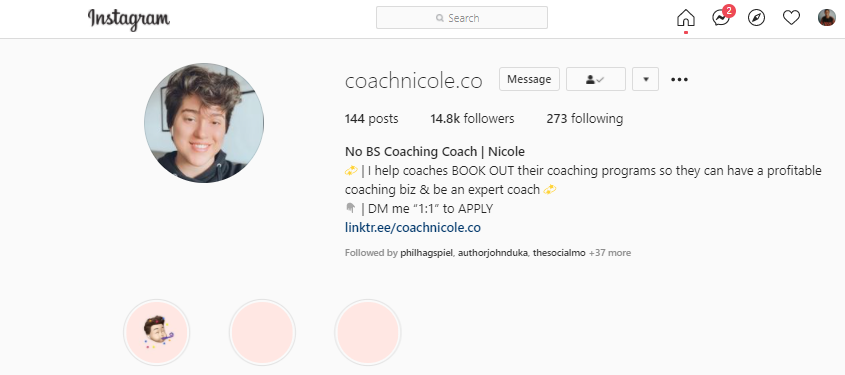
Your personal statement is your promise to your audience. In Nicole’s case, she promised her audience (coaches) to help them book out their coaching programs.
3. Add emojis
Emojis are a great way to help your audience feel welcomed so adding emojis to your bio on Instagram is saying welcome, I’m human and fun to your audience.
Use the emojis on the keyboard of your mobile phone when editing your bio on your mobile phone.
4. Include line breakers
In today’s world, people love to read things quickly. They want to spend the least possible time on things.
Adding line breakers to your bio on Instagram makes it easy for anyone to read your bio quickly. It relieves them of spending so much time reading your bio.
To include line breakers in your bio on Instagram,
- For desktop, you can type your bio as you want it to be displayed on Ms. Word and copy it into your bio
- For desktop and mobile, use emojis or symbols to create line breakers.
5. Use at least one hashtag or mention
Even Instagram recommends that you use hashtags (#) or mentions (@) in your bio. Hashtags help your account get seen by others especially if you are a small account trying to grow.
Here are some hashtag dos and don’t you need to note if you want to use hashtags in your bio on Instagram.
- Don’t just use any hashtags, use only hashtags related to your account and that your audience use.
- Don’t use generic hashtags: These types of hashtags have too many posts on them (10m upwards). Too many people add posts to them, your account and content will not get seen. An example is #motivation which has over a 200million posts.
- Don’t use banned hashtags: There are some hashtags that have been banned by Instagram. Avoid them totally, an example is beautiful. Whether it is on your bio or on your Instagram feed, avoid banned hashtags, they can get your account shadowbanned.
- Do use hashtags related to your audience: Make sure the hashtags in your bio is what your audience uses.
- Don’t use more than three hashtags: In order to make your bio not look like a spam account, do not use more than three hashtags. Plus, Instagram allows just 150 characters, you don’t want to waste it on hashtags.
6. Add a certification/recognition to show your expertise
Adding your certification to your bio on Instagram is a great way to build trust. If you have a certification or training in something, please feel free to flaunt it on your bio.
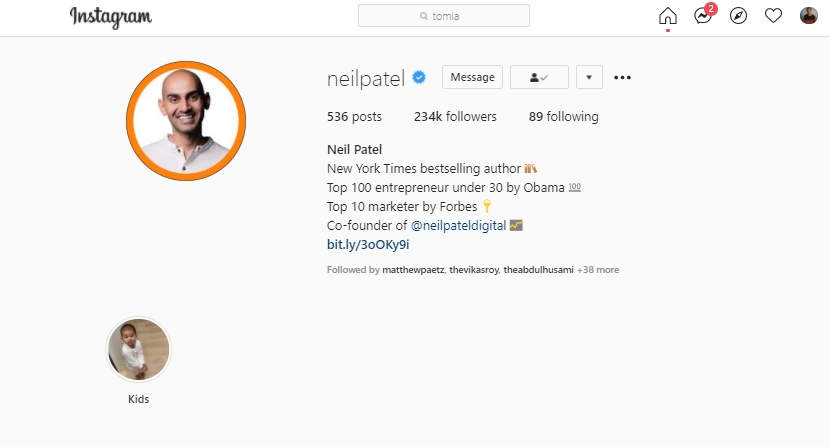
For example, digital marketing expert Neil Patel wrote this in his bio,
Top 100 entrepreneur under 30 by Obama, Top 10 marketer by Forbes.
However, if you do not have any certification or recognition, don’t feel bad. There are still other ways to build trust with your audience.
7. Don’t over-promise/Keep it simple
Always keep in mind that simplicity is key and simplicity wins at the end of the day.
You don’t have to write everything about you in your bio on Instagram. If it is not necessary, skip it.
Your bio on Instagram is not space for you to show off all that you can do and cannot do. It is a space to show your humanity, to let people connect with the real you and not what you are.
Also do not promise what you cannot deliver, doing that will only make people lose trust in you. So, keep it simple, let the creativity flow and enjoy yourself.
8. Do make sure you deliver on your feed what you promised in your bio
The last thing you need to understand in order to have a good bio is that your bio is like a promise of what whoever wants to follow should expect on your feed.
It is a must for you to keep that promise by making what you have on your bio the same as what you post on your Instagram feed. If you have promised to give your audience daily motivational quotes or posts, you must deliver that by giving them daily motivational quotes whether it is posting it on Instagram feed, Instagram story or IG TV.
With these eight tips, your bio on Instagram is good to go. Now that you have the tips, follow the following steps to learn how to edit your bio on Instagram on desktop and mobile.
How to edit your bio on Instagram on desktop
Let’s start with the desktop.
Step 1: Open your Instagram on your desktop
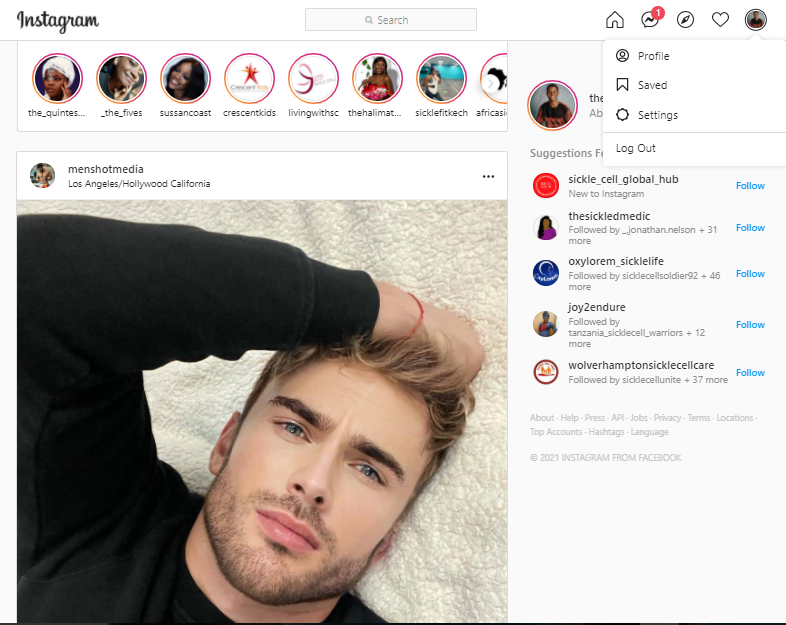
Step 2: Navigate to your profile by clicking the icon at the top right corner
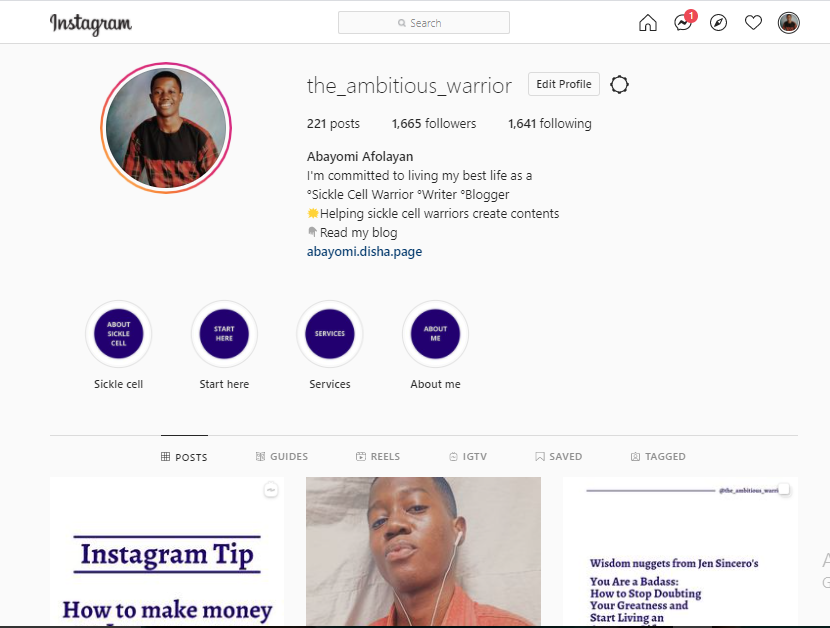
Step 3: Click on edit profile
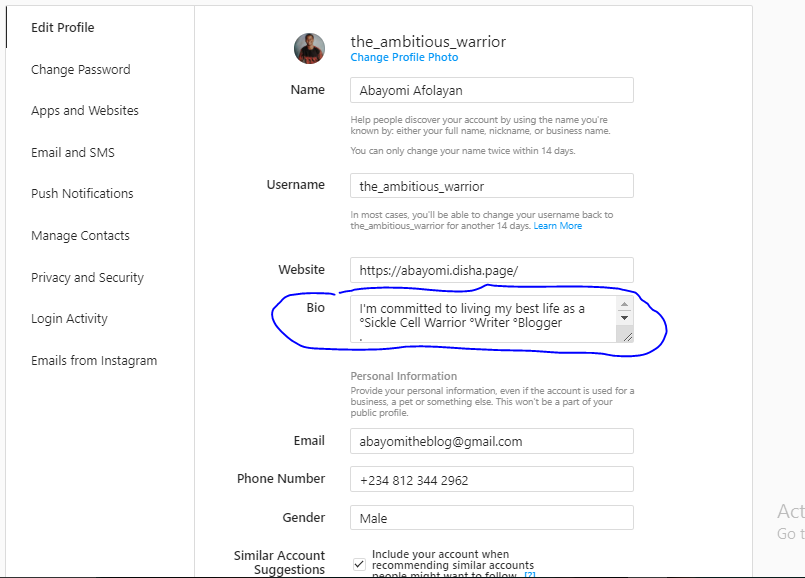
Step 4: Begin to edit your bio. Remember to include all of the tips shared earlier to help you write a great bio on Instagram.
Step 5: Once you’re done editing your bio, click submit to save your changes
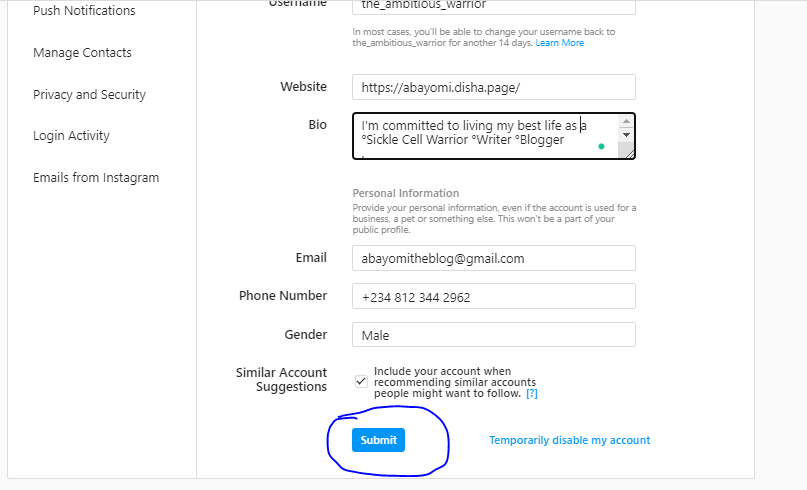
You would notice that it is not just your bio that you can edit on the desktop version, there are other things that you can edit in your profile like name, username, website, and more. Here’s what every one of them means,
Name
The name is just about your bio. People can discover your account by searching your name in the Instagram search bar.
It is important to use a name you’re known by, it could be your real name, a nickname, or even your business name. This name will be public and according to Instagram, you can only change it twice within 14 days.
Username
Your username is searchable as well, meaning, people can type a keyword into Instagram search and your account will be suggested.
When picking a username, it is important to add such keywords or keywords related to your account to your username.
If you’re wondering, a keyword is a word or group of words you type into a search bar to perform a search. For example, beauty bloggers, bloggers, writers, or coaches are all keywords.
So it is advisable to include keywords in your username. If you are a coach, for instance, you can add coach to your username (like coachnicole. co username). That way, when people type the keyword coach, your Instagram account stands a higher chance of being suggested.
Website
Instagram allows users to add one link to their profile. So you have the opportunity to add one link that would lead people to a page or wherever you want.
You might wish to include more than one link and you’re worried, don’t be. I have a tip for you.
Use a third-party website that allows multiple links.
There are third-party websites that allow users to build a single page with multiple links in it. So, the link of the third-party website is what you drop in the website bar.
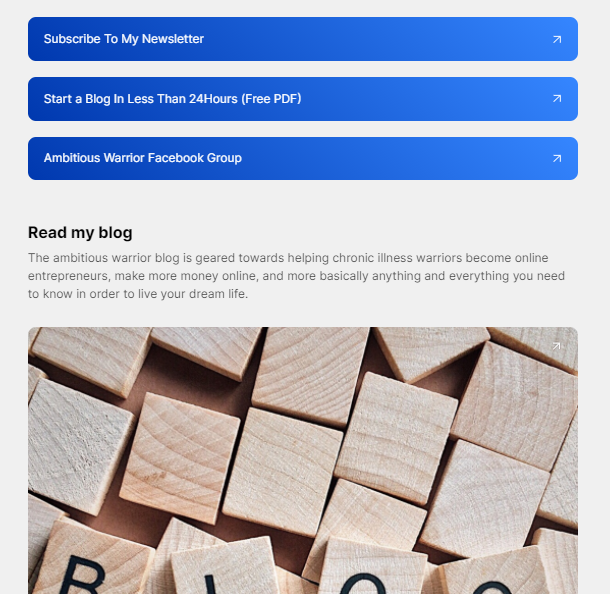
An example of a third-party website is Linktree. Linktree allows you to add more than one link on a page so that when people see that page, they see all your links. Another example is Disha.
Here’s what disha page looks like
Bio
It’s no longer news that you can edit your bio as well. Your bio is the first thing people see when they visit your account, try to make it interesting with the tips shared earlier.
If you wish you can add your email. It will be shared publicly as well.
Phone number
Just like your email, your phone number will be shared publicly as well so that people can reach you or your business whenever they want.
Gender
You can add and edit your gender as well in your profile.
Let’s move on to editing your bio on Instagram on mobile.
How to edit your bio on Instagram on mobile
Step 1: Open Instagram on your mobile phone

Step 2: Go to your profile by clicking the icon at the bottom right
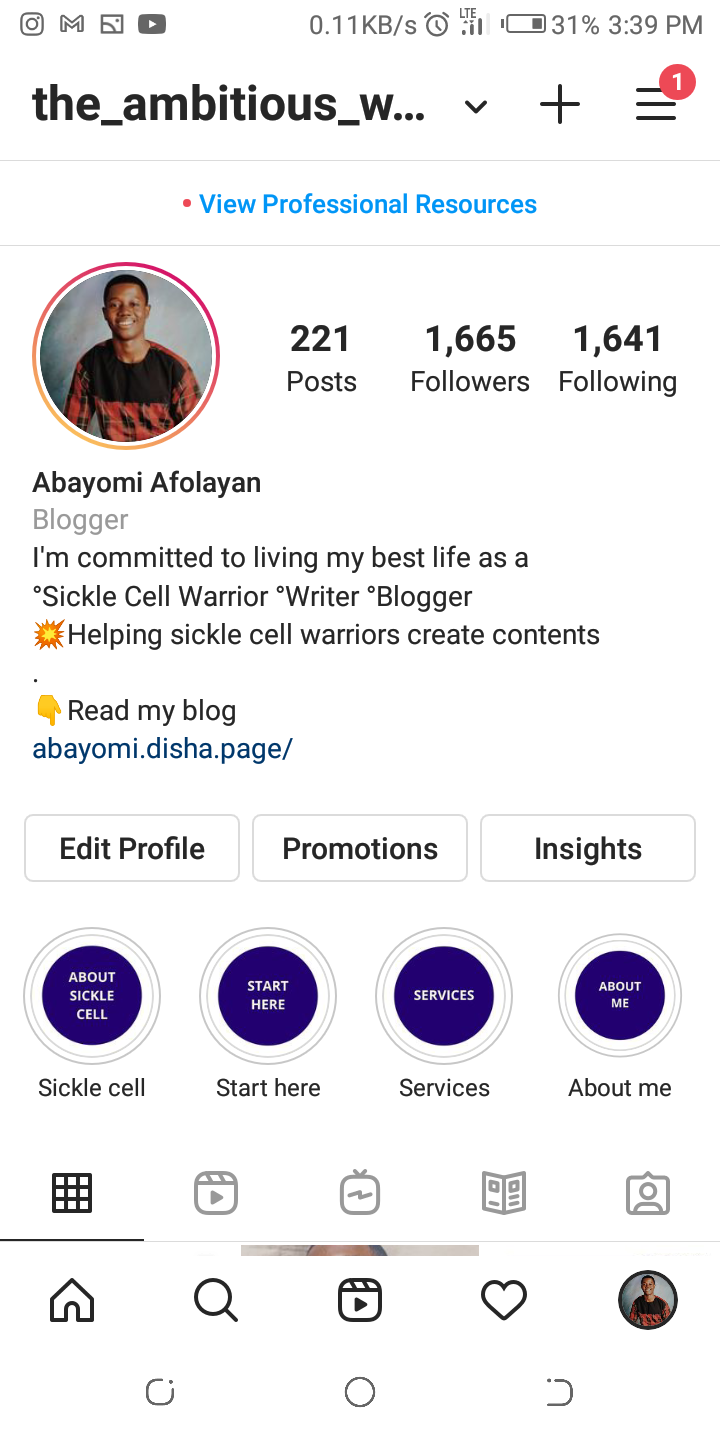
Step 3: Click on edit profile
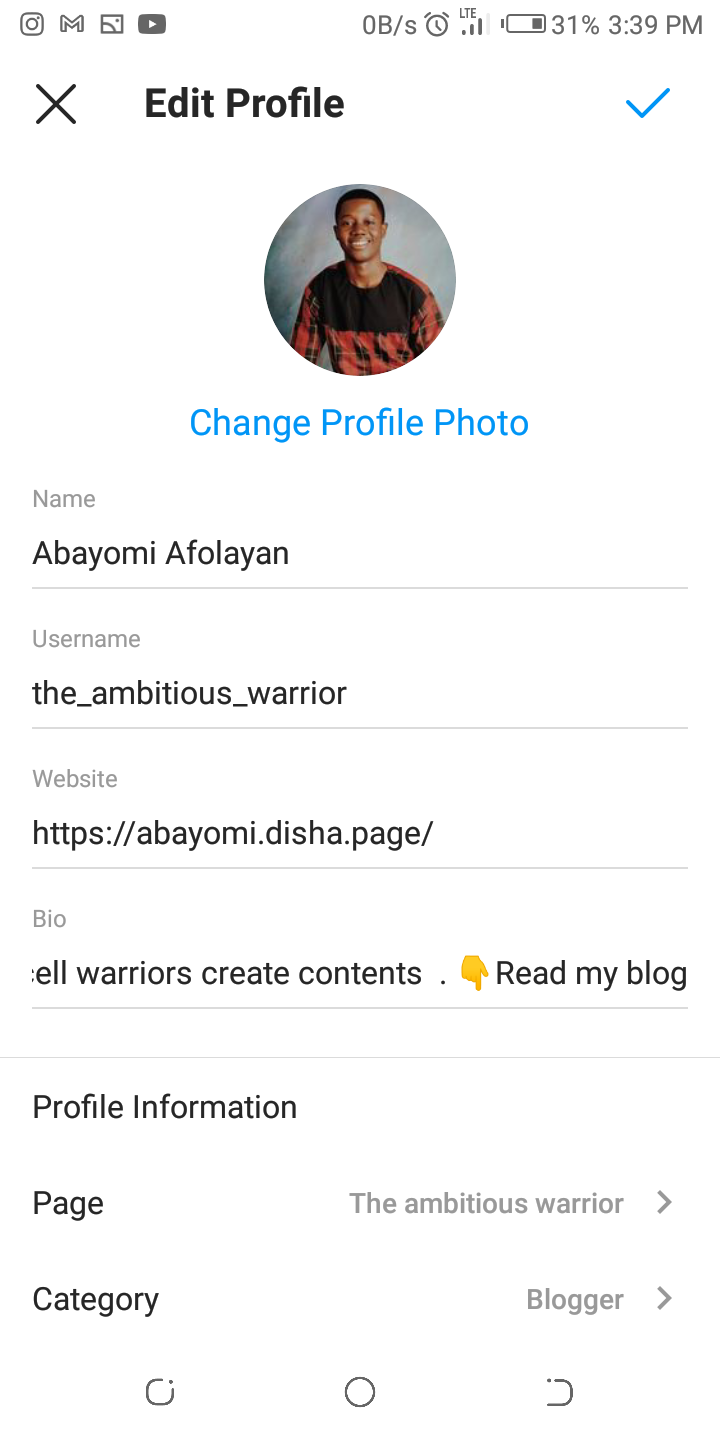
Step 4: Start editing your bio
Remember to use the tips shared earlier to write a great bio. Start with who you are, start clearly what you do and who you do it for, use hashtags and emojis, keep it simple.
Your bio is ready.
Step 5: Click the blue tick at the top right corner to save your changes
Conclusion
Having a bio on Instagram is important but having the right bio that speaks to your audience from the start is far more important.
A great bio increases the chances of your Instagram account getting seen by your ideal audience. Including keywords and hashtags in your bio on Instagram makes your account searchable. Including emojis creates connection.
If you’ve been finding it difficult to edit your bio on Instagram especially on the desktop, follow the steps shared in this article. It is super easy to edit your bio.