
If you want attention you shouldn’t miss instagram stories, a lot of instagram users want to perform different actions frequently, but they don’t realize there are restrictions on every action on instagram, right from follow/unfollow, to adding likes or sending Direct messages. These limitations are for the safety of all, users are protected in various ways, Instagram servers will be able to work efficiently and so on. Stories aren’t exempted to limitations on instagram, you’re limited on the type of Story you can upload and the maximum number of Stories you can upload on a daily basis.
Crossing these limitations can lead to account suspension or even permanent closure when you break these limits repeatedly. In this post we’ll share information regarding daily post limits on Instagram Stories, and not only that, we’ll also share other helpful information that will help any user utilize the Story feature wisely so that they can avoid getting their account terminated. Stay with us until the end to learn more about Instagram Stories.
Understand Instagram Limitations
Before we move on to share limits on Instagram Stories and other actions you need to understand the sources providing these limitation figures. Instagram hasn’t yet release any official statement that states the number of actions you can perform on your account, whether it’s likes, follow, comments, DM and more. The information you find online are just recommendations from Instagram users, some have tested these features and limitations, and decided to share on their blog.
Even though they share their true experience on Instagram, the information they provide is subject to change, since instagram release new updates regarding their services every now and then.
Another thing to understand is that every account has its own limits, most of the limits shared online are for new accounts. For older accounts with more engagement, they have higher limits when it comes to performing actions than other accounts. Business accounts also on the other hand have more privileges than regular accounts, there are some factors that play a role when it comes to account limitations on instagram, let’s outline them so that you take note of them;
Age of the Instagram account
As a new account holder, the moment you start to perform massive actions frequently, your account will be restricted. In most cases the account is terminated, because as a new user you haven’t even gathered enough followers nor have made any engagement and yet you started massive actions like sending bulk DM, massive likes and so on.
New accounts are limited on the number of actions they can perform and most of the time the limit number is low since you haven’t earned any credibility on the platform. Aged accounts on Instagram are considered to be at least three months old, but if it’s a couple of years old, it has even better advantages.
Number of followers
The more active followers you have on Instagram, the more trust you earn from their algorithm. But take note, I said ‘Active Followers’, buying followers won’t help you much. In fact, in recent updates, Instagram is now able to spot fake followers. Most celebrities that have used fake followers to increase their following have been spotted and their followers have been slashed by millions. What you need are followers that will interact with you by liking and commenting on your posts every single day.
Account activity
This is another factor that determines your limits on instagram. if you stick on doing the same activity, you’ll be spotted as a scam user. For example, you can’t just login to your account and start sending DM’s every single day, even instagram algorithm can make a guess you’re sending promotional messages. You want to do a mix of activities from the beginning to make your account look genuine.
Find pages or profiles you can interact with by adding helpful comments, these comments will be liked by other users and also like some posts from your own part, not too fast though. When you’re more active on the platform you’re increasing limits on various actions.
Engagement
When you make posts or share your stories, do people respond? If that’s so, your account has some level of engagement. The more people are engaging with you on instagram the more trust you have on your account and that means you’ll have more privileges than accounts with less or no engagement.
Make sure your followers are interacting and engaging with your posts, you can do that by asking them to comment, offering contests that require them to like and comment on your posts. Also encourage users to share posts with their followers.
These are some of the important factors that will play a role when it comes to your instagram account limitations.
Understanding Instagram Stories and limits
The days of scrolling through feed are fading away, Instagram Stories are now the best way to share your content on social media. Instagram stories are about takedown regular posts, almost 46% of Instagramer’s use Stories to share their content. The remaining 54% are still using regular posts and will shift to stories once they discover the benefits. Am not saying Instagram Stories are perfect, they’ve their downsides too, but you’ll reach more audience and have more control on Stories than on regular posts.
Is There A Limit To The Number Of Stories You Can Post Per Day?
A lot of users believe there is a limit, while others believe there are no limits. After some research we’ve discovered they’re both right.
First of all, you can add any number of stories you want in your account, no one is stopping you here nor your account will restriction on the feature.
But on the other hand, only 100 stories will stay in your account as well, the more stories you upload, the more will disappear. Typically, an Instagram Story disappear within 24 hours, if you however upload more than 100 stories in some hours, the older ones will keep disappearing.
So you can see that the answer for instagram limit, is a yes and no, if you don’t bother your previous stories disappearing in under 24 hours, you can upload as many as you want. And if on the other hand you want them to stay for the 24 hours’ mark, you shouldn’t upload more than hundred at a time.
So with that said, let’s move on to share helpful information regarding Instagram stories and how to get the most out of it.
Creating your Instagram Stories
• Open your Instagram app.
• Tap on the ‘Camera Icon’ that’s at the top left corner.
• Then you take a picture by using the white circle which is at the button, if you want to take a video, you should long tap the white circle and video will be recorded.
• If you don’t want to take live photo or video, you can upload pictures or videos from your gallery. You can do this by tapping the square gallery icon which is at the button of your screen, also you can swipe up any location on your screen.
• There are different formats to upload your stories, once you start using the Instagram Story feature, you’ll be able use them. The different formats include; Live, Type, Superzoom, Boomerang, Hands-FREE, Rewind, or Focus. You’ll need to select any of these options before you even tap the white circle to start taking pictures or record a video.
• Also if you’re taking photos without using the Instagram app, make sure to shoot the Stories vertically, this will ensure there is more space on the screen.

Checking Instagram Story Views
You might be interested to see how far your Stories have reached, especially if you’re a business owner. Tracking is a good way to find content loved by your audience. Checking views is one of the advantages of instagram Stories over regular posts, let’s share how to check your Instagram story views.
Open your story feed and locate the story you want to see the views for. You can see the views by double taping the story, you’ll also be able to view more data for that story. The story views are also displayed at bottom left corner of the story, a count will be displayed for the number of views.
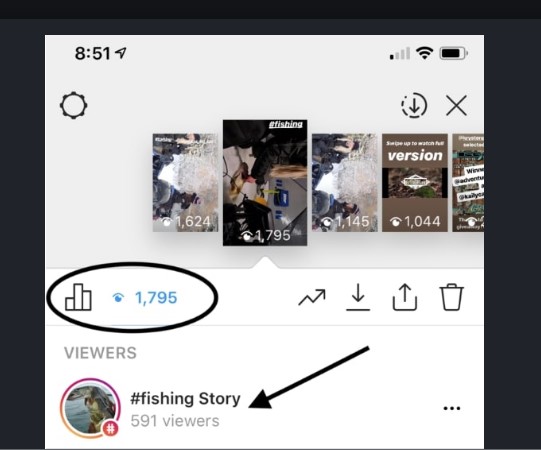
One important feature to note on Instagram Story is that you can hide some users from seeing your story, you just need to add their username by taping the three dots that’s at the right of user’s name. This way you’re not blocking them completely, they can view your profile and other posts, but they can’t see any of your stories.
How To Add Hashtags To Instagram Stories
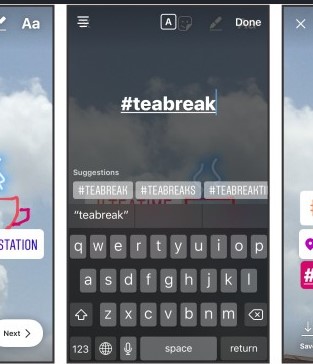
Adding the right Hashtags is a good way to reach out more audience, use hashtags that have thousands of users following them and you’ll notice increase in views for your stories. here is how to add the hashtags;
• Open Instagram Stories, that’s where all your stories are listed.
• Select the ‘Folded Smiley Icon’ that’s on top of the screen.
• You’ll notice the sticker that read #HASHTAG, tap on that and you’ll be given text filed to add your hashtags.
• Hit enter when you’re finished. Note that, you can add no more than 10 Hashtags for each story. Also when you’re adding up to 10, you should hide them under a text or sticker, this way they will not look cluttered.
These are some of the things you need to know about Instagram Stories, there are a lot of other features you can explore, the more you’re using Instagram Stories the more you’ll understand these features.
Let’s move on to share with you how you can use Instagram to your business advantage.
How To Use Instagram To Promote Your Business
Post breaking news regarding your industry
If you really want to engage with your audience, sharing what’s happening in your industry is the best way to do that. News can be found on different sources online for easy share, you can also record yourself sharing these news, you’ll be more connected with your audience than sharing third party content.
Posting news on instagram Stories will make them come back to your feed for more. News content will not cost you anything, you just need to research on what’s happening within the industry and then share with your followers. If you’re not utilizing news, you better start uploading them on Instagram Stories right away.
Post footage of office or business event
If you want to stay connected on any social media platform, you need to become as human as possible, one of the best ways to do that is by sharing videos of company events, whether they’re office events or any form of company activity that’s happening in your business.
Showcase your products
Companies and businesses are using Instagram Stories to promote their products and services, but this is not something you should do often, share valuable information in your Instagram stories before pushing your products. The rule should be 80/20, that’s to say 80% of your stories should be about helpful information, then the remaining 20% can be about promoting your products and services. Promote your products so that you can maximize your profits.
Promote your blog posts
With Instagram stories you can get more exposure to your blogposts, this means more traffic to your websites. There are lots of apps available right now that can help you convert your blog posts into videos with a few clicks. These videos can then be uploaded to your instagram Stories; you then leave your blog URL where users can get more content.
Share testimonials
Testimonials will help you win customers more than you can imagine, if you can get video testimonials from your previous clients, that will be awesome because you’ll use it in your marketing arsenal. If you don’t currently have video testimonials, you should start compiling them, reach out to your previous clients and offer more value to them in exchange for video testimonials.
We’ve reached the end of this post, share your thoughts in the comment section below on how you’re utilizing Instagram stories to promote your business or services.